SampleQC
The Sample QC application is utilised to ensure sample quality, with an emphasis on RNA-seq and similar platforms. The application presents data supplied by the STAR aligner tool, Samtools, and the HTSeq package.
Samples can be selected through the “Sample selection” option located on the left side of the interface.
Refer to Sample Selector documentation under General widgets in Data for detailed explanation.
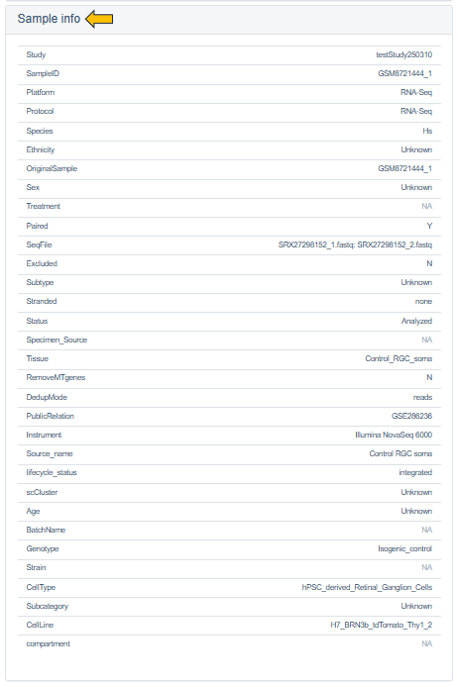
The Sample Info panel summarizes key experimental and biological attributes, including platform, protocol, tissue type, cell line, and sequencing configuration, enabling users to quickly contextualize the selected study.
The detailed tables and figures for specific quality control aspects or platforms are available on the panels located on the right-hand side.
Alignment stats tab
This tab provides a detailed description of various alignment-related metrics with the help of plots and statistics table. The metrics can be chosen with the help of a drop-down as shown below:
Refer to Alignment Stats plot interpretation under the general plot interpretation documentation in Data for detailed explanation about the plots.
The Align statistics table presents detailed sequencing and alignment performance metrics across samples. These include total reads, uniquely mapped reads, mapping percentages, read distribution statistics, etc. Together, these metrics allows to assess data quality, identify potential outliers, and ensure consistency across samples prior to downstream analyses.
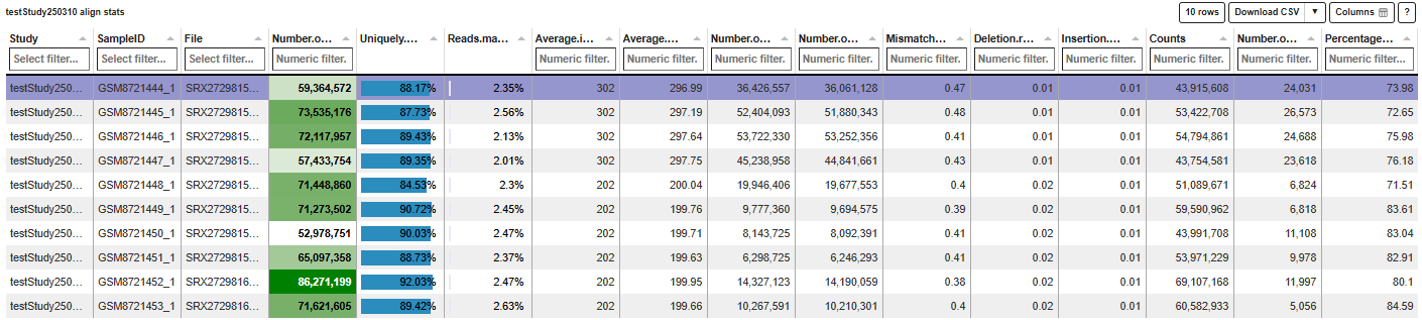
Refer to Stats Table panel documentation under the general widgets in Data for more information about the options available in the stats table.
Read distribution tab
This tab visualizes how sequencing reads are distributed across genomic features, enabling quick assessment of library composition and annotation enrichment for the selected sample.
Refer to Read distribution plot interpretation under the general plot interpretation documentation in Data for detailed explanation about the plots.
The Read distribution statistics table provides a quantitative breakdown of read counts normalized to feature length (Kb) across genomic regions (e.g., CDS, UTRs, introns, and flanking regions) for all samples, facilitating comparative quality assessment and detection of distribution biases.
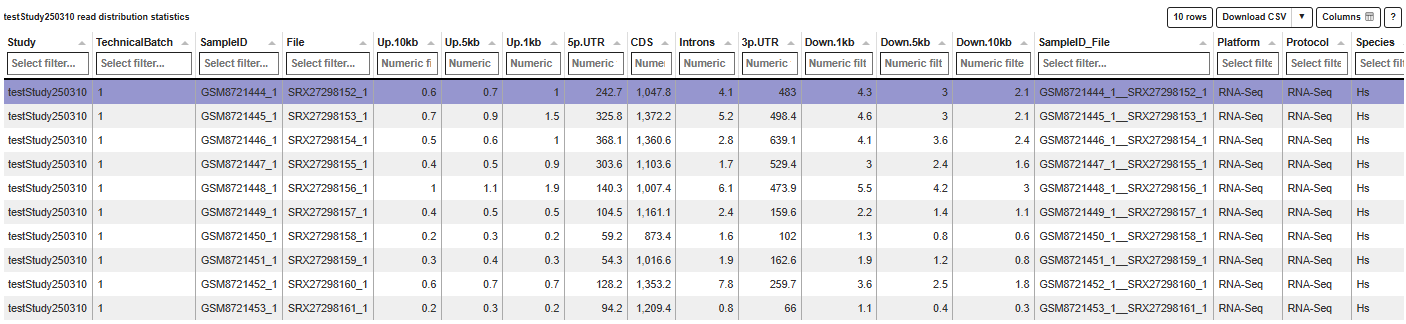
Refer to Stats Table panel documentation under the general widgets in Data for more information about the options available in the stats table.
Gene body coverage tab
This tab visualizes the distribution of read coverage along gene bodies (from 5′ to 3′), allowing users to assess coverage uniformity across transcripts. It is particularly useful for identifying technical biases, such as 5′ or 3′ enrichment, which may indicate RNA degradation or library preparation artifacts.

-
Select a gene of interest from the dropdown menu in the Single Gene Coverage section under the statistics table, to visualize its coverage profile across samples.
-
Use the Maximum Number of Samples for Comparison field to limit how many samples are displayed simultaneously, and click Load data to generate the plot.
-
The checkbox Show normalized coverage toggles between raw and normalized coverage values, enabling more meaningful comparisons across samples with varying sequencing depths.
Refer to Gene body coverage plot interpretation under the general plot interpretation documentation in Data for detailed explanation about the plots.
The Gene body coverage statistics table reports normalized coverage values across gene body percentiles (5′ to 3′) for each sample, providing a detailed numerical representation of the plotted curves. This allows users to quantitatively assess coverage uniformity, compare samples, and identify biases such as 5′ or 3′ coverage skew.
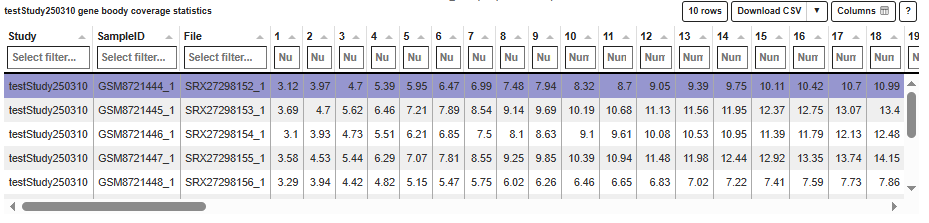
Refer to Stats Table panel documentation under the general widgets in Data for more information about the options available in the stats table.
Biotype tab

This tab visualizes the distribution of reads mapped to different gene biotypes (e.g., protein-coding genes, pseudogenes, rRNA) as a bar chart. It compares the highlighted sample(s) against the mean across all selected samples, enabling detection of shifts in biotype composition that may indicate technical biases or sample-specific characteristics.
Refer to Biotype plot interpretation under the general plot interpretation documentation in Data for detailed explanation about the plots.
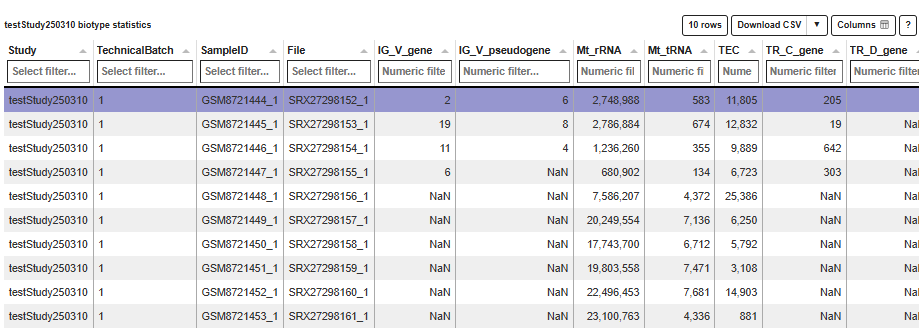
The Biotype statistics table provides the underlying read counts for each gene biotype across all samples, offering a detailed quantitative view of biotype composition. This allows users to compare samples, validate trends observed in the plot, and identify outliers or enrichment in specific biotype categories.
Refer to Stats Table panel documentation under the general widgets in Data for more information about the options available in the stats table.
Mitochondrial tab
This tab displays boxplots of the percentage of reads mapped to mitochondrial genes, non-mitochondrial genes, and spike-in transcripts across selected samples. It enables comparison of the highlighted sample(s) against the overall distribution (median and quartiles), helping to identify deviations that may indicate issues such as cell stress, RNA degradation, or technical artifacts.
Refer to Mitochondrial plot interpretation under the general plot interpretation documentation in Data for detailed explanation about the plots.
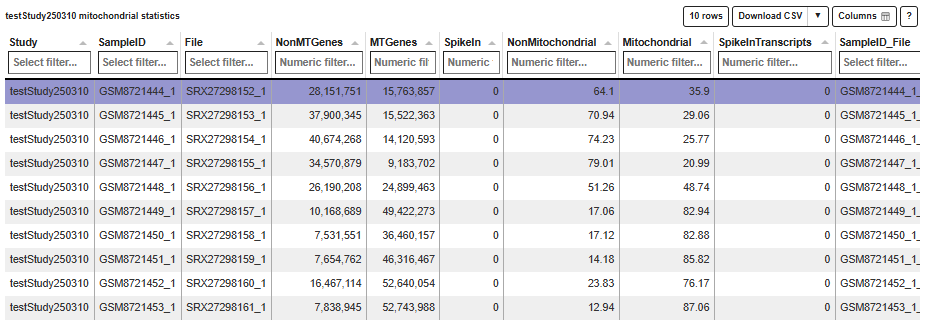
The Mitochondrial statistics table provides detailed read counts and corresponding percentages for mitochondrial, non-mitochondrial, and spike-in transcripts for each sample. This allows users to quantitatively assess mitochondrial content, compare samples, and validate trends observed in the boxplots.
Refer to Stats Table panel documentation under the general widgets in Data for more information about the options available in the stats table.
Parameters tab
This tab shows the software versions and databases used for alignment and read counting of the selected samples. For optimal comparability, these parameters should be identical for all samples within a comparison.
- The Overview table gives an overview and displays the number of samples which were processed with a specific combination of software versions and databases.

The Details table lists the parameter for the individual samples.

Gene counts tab
This tab shows the mean and sum of counts for the selected study samples and genes. In addition, mean normalized expression values are displayed. If no genes are specified, the top 250 genes according to mean normalized values are selected.

Single cell RNA-Seq tab
In this tab, single cell RNA-Seq statistics and plots are displayed for the current sample divided into several subpanels. The number of shown barcodes or genes can be adjusted using the slider at the top of the panel, respectively.

Barcodes are usually sorted according to the sum of associated reads and plotted on the x-axis (barcodes with highest sum on the left-hand side). In the following, individual subpanels are described in more detail.
-
Stats: Table of general file specific statistics. - The column “Detected” contains the number of sequenced reads or detected UMIs (Unique Molecular Identifiers identifying individual transcripts). - “All” contains the corresponding reference number in order to calculate percentages (“Percent”). - The rows correspond to: - the number of read assignments in the alignment (featureCounts output), - the number of multimapping and uniquely mapped reads, - the number of reads assigned to a feature (usually exon), - unmapped reads, - reads assigned to no feature, - ambiguously mapping reads, - reads not assigned due to low quality, - the number of distinct UMIs after deduplication of reads and, - the number of UMIs mapped to special spike-in sequences (e.g. phiX). - Note that most phiX reads should have been removed during preprocessing.
-
Expressed Genes: Plot showing the number of genes (y-axis) above (greater or equal) a particular UMI count threshold (see legend). * Default threshold, which is also used for cell filtering, corresponds to 2 UMIs. * This plot is very useful when trying to estimate the number of sequenced cells vs noise.
-
Mt Genes: Plot showing the ratio of reads or UMIs per barcode assigned to mitochondrial genes.
-
Amplification (Barcodes): Plot displaying the summarized read or UMI counts per barcode. This can be used to estimate cell number or check PCR amplification issues.
-
Amplification (Genes): Plot showing the summarized read or UMI counts per gene. This can be used to check for a gene specific bias in amplification.
-
Amplification (Gene List): Plot showing the genes with the highest read count and their fraction of the total read count. * This helps to identify over represented genes which might indicate a contamination. * Mitochondrial and ribosomal protein coding genes are expected to have high counts.
-
Species Distribution: Plot displaying the distribution of species specific UMIs per barcode in mixed species control experiments. * Each dot corresponds to one barcode. * The sum of UMI counts associated with genes corresponding to the first species is depicted on the x-axis, the sum of UMI counts associated with the second species on the y-axis. * This plot is shown only for mixed species samples and can be used to estimate contamination or cell doublets (more than one cell associated with the same barcode). * Dot color corresponds to species classification. * Note that the number of displayed barcodes can be adjusted using the slider at the top of the panel.
-
Barcodes: Summarized statistics for filtered barcodes (potential cells).
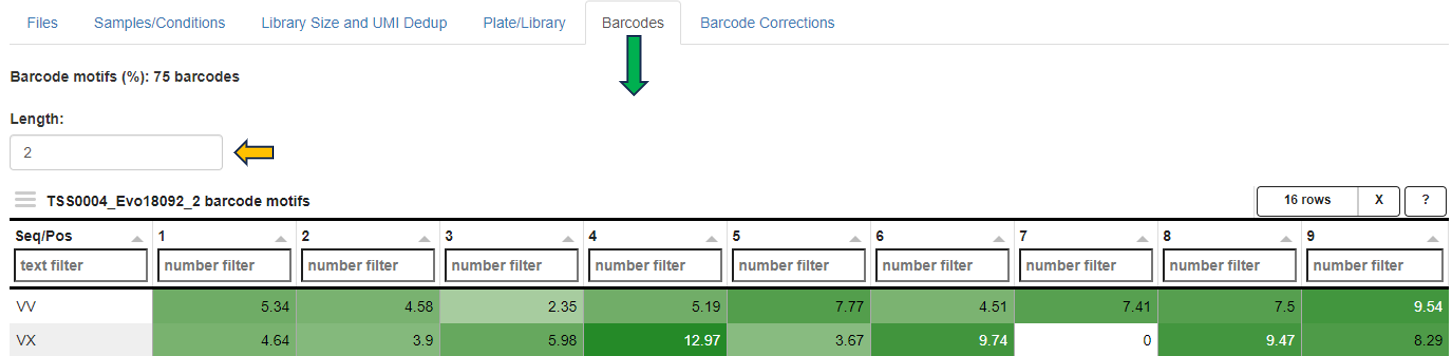
* The first table shows: - the number of filtered barcodes ("Cells"), - the number and percentage of these barcodes matching the 10xgenomics whitelist ("Matching10x" and "Percent", not used in the preprocessing), the number of reads for all filtered barcodes ("Reads"), - the corresponding number of UMIs ("UMIs"), - the ratio of reads vs UMIs for the filtered barcodes ("Amplification"), - the ratio of reads for the filtered barcodes vs all barcode associated reads ("ReadCoverage"), and - the ratio of UMIs for the filtered barcodes vs all barcode associated UMIs ("UMICoverage") per sample ("Sample"). * The second table contains count statistics for individual filtered barcodes. - *"Sum"* corresponds to the sum of associated reads, - *"Dedup"* to the number of deduplicated reads or UMIs, - *"Genes"* to the number of genes above (greater or equal) the default UMI count threshold (usually 2). * The third table shows the UMI count percentage/frequency of particular sequence motifs at particular barcode positions. - Each position (column) sums up to 100 percent. - This view can be used to identify position dependent preferences. - The motif length can be adjusted interactively. - The last table contains statistics on filtered barcodes with very similar sequences (one base mismatch/deletion/insertion). - Too many rows may indicate issues with the barcode correction during preprocessing. - *"Counts"* correspond to UMIs, "N" to the number of sequence neighbors (barcodes with similar sequence). -
Cumulative Fraction: Cumulative fraction plot of the sorted barcodes. * This plot shows the fraction of reads or UMIs associated with the first N barcodes (descending order of read sum). * It can be useful to estimate the number of sequenced cells (barcodes representing most of the reads) or check the PCR amplification rate (reads vs UMIs) and issues with ambient RNA (no saturation of fraction). * Note that the number of shown barcodes can be adjusted using the slider at the top of the panel.
Plate based RNA-Seq tab
This tab contains special QC statistics for selected (high-throughput) plateRNA-Seq samples splitted into separate panels. A plate is usually represented by two sequence files,
- the first one contains the (well specific) barcode and transcript UMI sequence and
- the second the actual cDNA read sequence which needs to be aligned to the genome.
- In the first step of preprocessing, unwanted sequences are filtered out and the corresponding barcodes are skipped, e.g. reads matching to phiX sequences, which were added by the sequencing provider.
- The other barcode sequences are then matched with the expected well barcodes and the corresponding reads are written out to single well/barcode specific files (the read sequence corresponds to the cDNA and the UMI is added to the read ID).
- This demultiplexing procedure also checks for barcode sequences with a single base mismatch or insertion/deletion compared to one of the reference barcodes and corrects this variant (assuming a PCR or sequencing error).
- The well specific sequence files are then aligned to the genome of interest and distinct UMIs are counted per barcode/well and gene (deduplication process).
In the following, the individual subpanels are described in detail.
- Files: Table showing statistics for all plate sequence files corresponding to the selected (reference) samples. - “TotalReads” correspond to the number of reads detected in the input file, - “Skipped Reads” to the number of reads which were filtered out (e.g. phiX), - “Matching Reads” to the number of remaining reads whose barcode sequences match one of the reference barcodes exactly, - “HammingReads” to the number of remaining reads which match assuming one base mismatch (Hamming distance 1), - “SeqlevReads” to the number of remaining reads which match assuming a single insertion or deletion (sequence Levenshtein (edit) distance 1), - “NotReads” to the number or remainig reads which could not be matched. - “PercentDemux” is the percentage of the sum of “Matching Reads”, “HammingReads”, and “SeqlevReads” divided by “TotalReads”. This readout should ideally be in the range between 90 and 100 percent. - “PercentSkipped” is the percentage of “Skipped Reads” divided by “TotalReads”, which should be below 5 percent.

-
Samples: Table showing the sum of UMI counts for selected samples. - Columns in the middle of the table correspond to project factors/categories associated with multiple values for the selected samples. They can be used to filter the table for display. - The column “Counts” corresponds to the final sum of deduplicated UMI counts per sample/barcode. - The background colors match the respective values (from white for low counts to dark green for high counts). - “Reads” represents the sum of demultiplexed reads for the corresponding barcodes and “Percent” the percentage (“Counts” vs “Reads”). - Note that “Reads” also includes reads which could not be uniquely aligned to exon features. A low percentage may indicate issues with read alignment and/or library amplification. - “ExactM” corresponds to the percentage of exactly matching barcode sequences compared to the sum of matched barcodes (exact match, one base mismatch, or one insertion/deletion). - Ideally, this readout should be above 90 percent and comparable for all wells on a plate. - By means of the “Grouping factors” selection box, only the selected factors/columns can be viewed before summarizing. - This can be useful for reducing the table size or summarizing across multiple factor levels.
-
Plate: Table showing the color-coded UMI count sums per well in a plate layout. This plot is only shown in case well IDs are provided in the sample table (column “Well”). In case samples from multiple plates (see sample table “Plate” column) are selected, the plate IDs are added to the row part of the well IDs, resulting in stacked plate layouts.
Refer to plateRNA-Seq plot interpretation under the general plot interpretation documentation in Data for detailed explanation about the plots.
- Barcodes: Table of UMI count percentage/frequency of particular sequence motifs at particular barcode positions. Each position (column) sums up to 100 percent. This view can be used to identify position dependent barcode motifs. The motif length can be adjusted interactively.